
To make an AI talking character video, you pick a character, write the lines or give an idea, choose a voice, and have every line performed on camera, lip-synced. In ClipFlux that is the Talking character format: each line comes back as its own clip of your character saying it, with captions timed to the spoken words, in 9:16 for TikTok, YouTube Shorts and Reels. It works for one character talking to the camera or a conversation of up to 4 people.
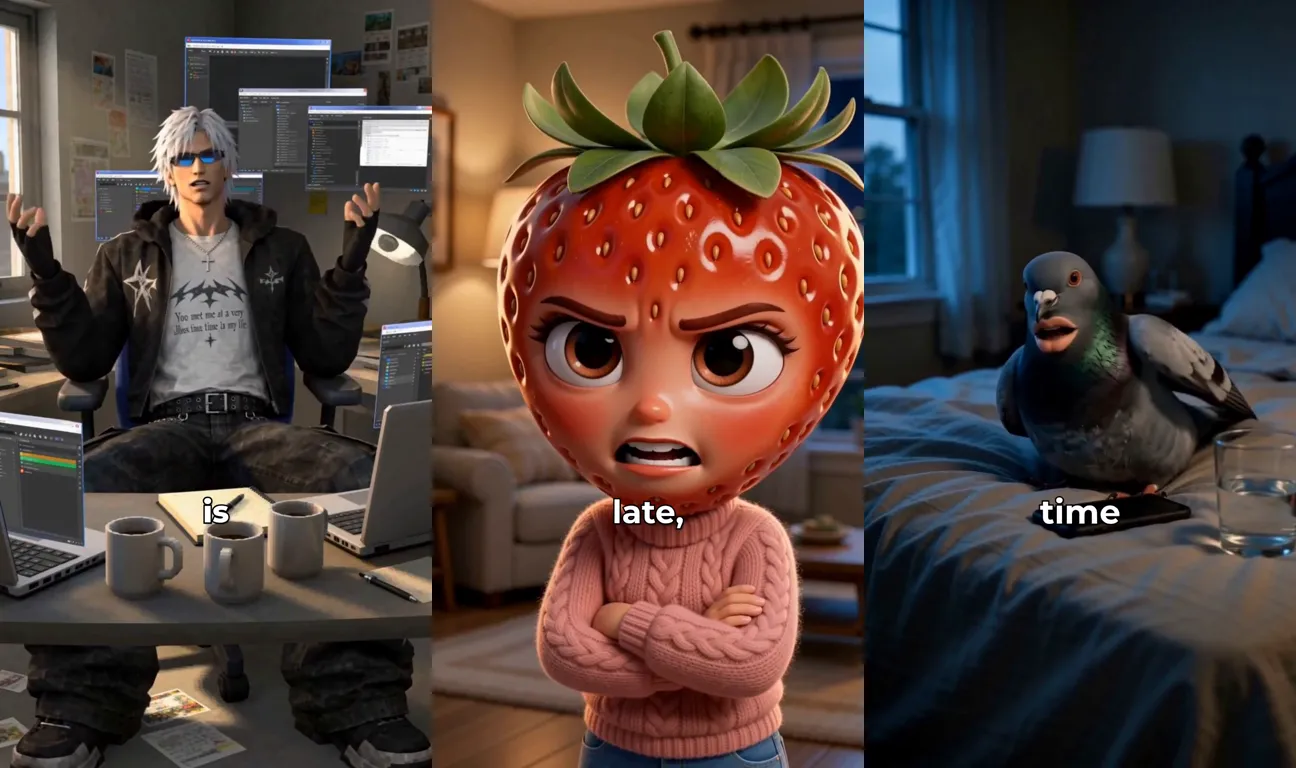
ClipFlux talking characters, in short
- Every line is performed on camera by your character and lip-synced to the voice.
- One character to the camera, or up to 4 people in a conversation, each with their own face and voice.
- Your words exactly (Script, up to 150 words, about a minute) or, for one character, lines written for you from an idea (an opening plus up to 8 more).
- 95 voices across 13 languages, each with a preview.
- Captions timed from each clip’s own audio, so they stay in sync with the mouth.
- Any character: a built-in one, one you design in a style, or an upload of your own face.
- Regenerate one line without remaking the whole video.
- A free preview on free accounts, and channels that post one every day.
What a talking character video is, and what it is not
Most AI videos are narrated: a voice tells a story over pictures, and nobody on screen speaks. A talking character video turns that around. The character is the one speaking, framed close enough that you can see the mouth move with every word, the way a creator talks to their phone. That is why it suits the formats people already watch on TikTok: storytime, rants, reminders, product pitches, and skits where two or three characters argue.
It is not a talking-photo filter. A filter wobbles a still mouth over a fixed image. Here each line is a short generated clip: the character moves, gestures and reacts, and the camera can push in or drift, while the face stays the character you picked.
Step 1: Pick who talks
Every clip is made from the character’s picture, so the picture decides the face in every line. In ClipFlux you can pick a built-in character, design a new one in any style (a fruit with a face, a PS2 game hero, a pigeon with human lips), or upload a photo. Save the character and reuse it: a face that comes back every day is what turns a video into a channel people follow.
If you upload a real person, it should be you, or someone who has said yes. A realistic face that says words its owner never said is the one thing not to make.
Step 2: Write the lines, or give an idea
On the create page choose the Talking character format. In Script mode your words are performed exactly as written, up to 150 words, about a minute. In Idea mode you describe what the video is about and ClipFlux writes the lines for one character, an opening plus up to 8 more. A conversation is written in Script mode. Lines written to be said aloud look like this:
- One thought per line, 10 to 20 words. Each line becomes its own clip, and a clip lands best when it says one thing.
- The first line is the hook. Start in the middle of something: a complaint, a confession, a question the viewer wants answered.
- End on a punchline or a turn. The last line is the one people rewatch.
- For a conversation, put the name first. “Maya: Did you see that?” on one line, “Jake: See what?” on the next. The names are labels and are never spoken. The line editor does this for you: Enter starts the next person’s line.
Step 3: Give the character a voice
The voice carries more of the character than the picture does, so play a few previews before you pick. A low, dry voice makes deadpan lines funnier (Benjamin is the one for a talking pigeon); a bright, quick voice suits a hype pitch. In a conversation, give every person a different voice so the viewer knows who is talking even before the cut. Voices are grouped by language, so a Spanish or Swedish script gets a native speaker.
Step 4: Generate and check every clip
ClipFlux records each line in the chosen voice, then makes a clip of the character performing it: lips in time with the words, hands and face moving, framed close. In a conversation every line is a close-up of whoever says it, turned toward the other person, so the video cuts between them like a TV scene. The silence before and after each line is trimmed off, and the captions are timed from the clip itself.
Then watch it line by line. Check three things: the words are your script, the face is your character, and the mouth matches. If one line misses, regenerate that line instead of the whole video.
Step 5: Post it, or put it on autopilot
Export it in 9:16 or post it straight to TikTok or YouTube, and turn on the platform’s AI-generated label, especially for a realistic face. To post one every day on a paid plan, set up a ClipFlux channel with Talking character as its format: give it one character, or a conversation cast, and it writes and makes a new video from each day’s idea, dialogue included. The details are in how to automate TikTok videos.
Ideas that work as talking character videos
- AI fruit drama: fruit characters with faces in a soap-opera scene, the Fruit Love Island style.
- The talking pigeon: a pigeon with human lips and a deep voice asking if you have pooped today.
- The PS2 rant: a game character’s deadpan rant that ends on “You met me at a very ___ time in my life”.
- Two characters talking: skits, arguments and interviews that cut between the speakers.
Questions
Can two AI characters talk to each other?
Yes. Start each line with a name ("Maya: ...", "Jake: ...") or use the line editor, and give each person a character and a voice. Up to 4 people; each line is a close-up of whoever says it, looking at the other person rather than the viewer.
How long can a talking character video be?
About a minute. A pasted script holds up to 150 words, and an idea becomes an opening line plus up to 8 more.
Do the lips really move with the words?
Yes. Each clip is generated from the character picture and the spoken line together, so the mouth follows the voice, and the captions are timed from the clip itself.
Can I make a real person talk?
Only yourself, or someone who has given you permission. A realistic person is AI-made, so turn on the AI-generated label when you post.
Is there a free way to try it?
Yes. On a free account the first talking video is a free preview: the opening lines are animated, and you can finish the rest any time.