
To make the AI talking pigeon video, the one where a pigeon with human lips leans into the camera and asks if you have pooped today, you make a pigeon character, give it a low, deadpan voice, write a short reminder for it to say, and have every line lip-synced on camera. In ClipFlux that is a Talking character video: your pigeon says each line in its own clip, mouth in time with the words, with captions, in 9:16 for TikTok, YouTube Shorts and Reels. The deep voice is Benjamin.
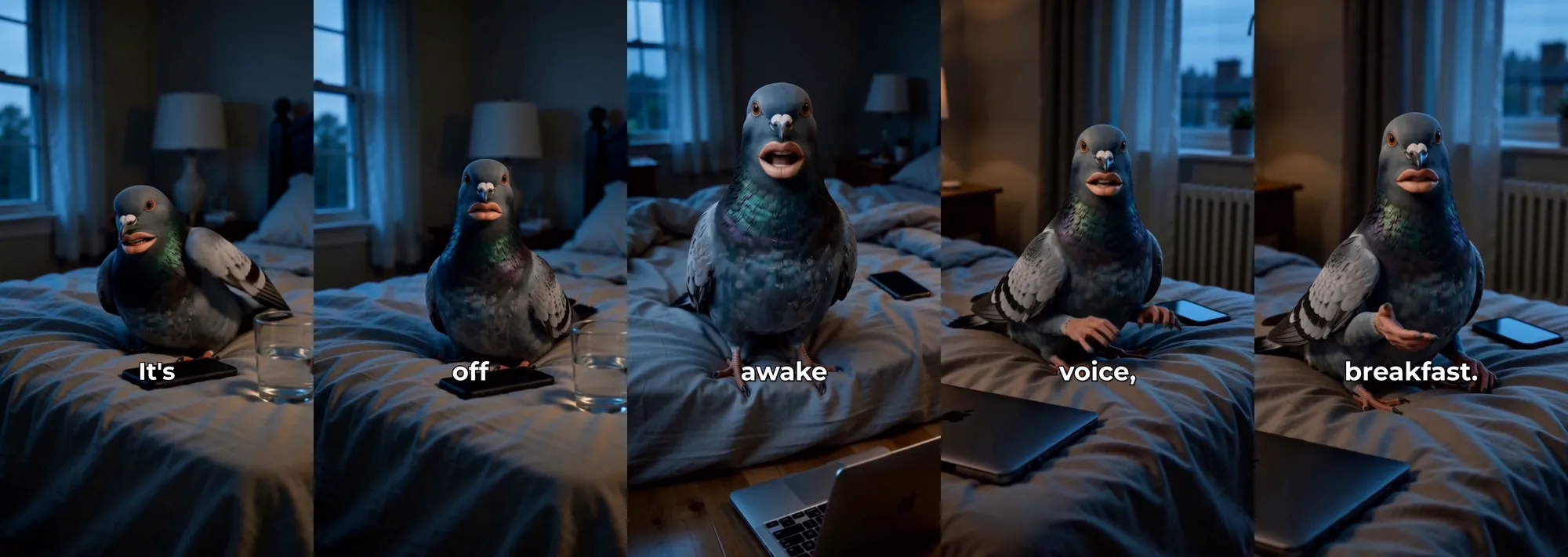
The AI pigeon video in ClipFlux, in short
- Your own pigeon character with human lips, the same bird in every clip.
- A deep, dry, unhurried voice: Benjamin.
- Every line lip-synced on camera, with captions timed to the words.
- 20 to 30 seconds, written by you or from a one-line idea.
- Regenerate one line if the beak and lips slip, not the whole video.
- A free preview on free accounts, and channels that post one every day.
What the talking pigeon trend is
The videos are simple: a realistic grey pigeon with human lips sits close to the camera, somewhere ordinary, and talks to you in a slow, deep voice about something very everyday. The best known asks whether you have pooped today. The joke is the contrast: a bird that should not talk, a voice far too calm and too low for it, and a question nobody asked. Many of the viral clips come from pigeon characters on Cantina, an AI character app, and from the Whispering Pigeon by TikTok creator @peigengoo28. ClipFlux is not affiliated with either; this guide shows how to make your own pigeon, with its own lines.
Step 1: Make your own pigeon character
In ClipFlux, create a character and describe it: a grey city pigeon with iridescent green neck feathers and full human lips, sitting on an unmade bed in a dim bedroom at dawn. The picture decides how the bird looks in every clip, so get it right once and save it. Ordinary settings work best: a bed, a windowsill, a kitchen counter, the passenger seat of a car. Give your pigeon one thing that is its own, a setting or a prop, so it is not anyone else’s bird.
Step 2: Pick a deep, dry voice
This is the step that makes or breaks it. The voice has to be low, slow and completely unbothered, like it has said this to a thousand people this morning. In ClipFlux that is Benjamin: low, dry and unhurried, with a just-woke-up rasp. A bright or fast voice turns the same pigeon into a cartoon, and the joke is gone. Play the Benjamin preview before you pick anything else.
Step 3: Write a 20 to 30 second reminder
The pigeon talks straight to the viewer about one everyday thing, calm and almost caring, and ends on a punchline. Short sentences, and a pause where you want one: the three dots tell the voice to wait. Here is the script behind the frames above:
Wakey wakey, it’s time to post.
I know you don’t want to post today, but unfortunately... the algorithm doesn’t take days off.
Sit up. Open your laptop. Come on.
Your followers are already awake, and somehow you aren’t.
No camera. No editing. No excuses.
Type your idea, pick a voice, and hand it to... ClipFlux.
Now go eat breakfast. Your video will be ready before you’ve finished.
Reminders that suit a deadpan pigeon, to make your own:
- “Have you had water today? Not coffee. Water. I’ll wait.”
- “Your mum texted you three days ago. You saw it. I saw you see it.”
- “It’s two in the morning. Put the phone down. Yes, after this video.”
- “Stand up. Stretch. Your back is making decisions without you.”
- “You said you’d start on Monday. It’s Thursday.”
Not sure what to say? Give ClipFlux a one-line idea instead, like “a pigeon reminds you to drink water”, and it writes the lines.
Step 4: Generate and check the lips
ClipFlux records every line in Benjamin’s voice, then makes a clip of your pigeon saying it: lips in time with the words, head tilting, the occasional human hand. The silence around each line is trimmed off and the captions are timed from the clip. Watch it once and look at the mouth. If a line slipped, regenerate that line alone.
Step 5: Post it, and keep the pigeon
Post it in 9:16 with the platform’s AI-generated label on. Then bring the same pigeon back with a new reminder tomorrow: a recurring character with a recognisable voice is what people follow, and the pigeon is already saved. To post one every day on a paid plan, give a ClipFlux channel the pigeon, Benjamin and Talking character as its format, and it writes and makes a new reminder from each day’s idea. See how to automate TikTok videos.
More talking character videos
- How to make AI talking character videos: the full guide, for any character.
- AI fruit drama videos: fruit characters with faces in a soap-opera scene.
- The PS2 rant: a game character’s deadpan monologue to camera.
Questions
What is the pigeon Cantina video?
Many of the viral AI pigeon clips are video messages made with pigeon characters on Cantina, an AI character app. ClipFlux is not affiliated with Cantina; it makes the whole video, script, voice, lip-sync and captions, from your own pigeon character.
Where does "have you pooped today" come from?
From the Whispering Pigeon, an AI character by TikTok creator @peigengoo28 that leans into the camera and asks viewers if they have pooped. Make your own pigeon and your own lines rather than copying that character.
Which voice should the pigeon have?
A low, dry, unhurried voice. In ClipFlux, Benjamin. For the whispering version, write short, soft lines; the voice keeps its deep tone.
Can I use the original pigeon?
No. Another creator's character is theirs. Make your own pigeon with its own look and lines, and keep it as your channel's character.