
To make a "What if" video with AI, you write one hypothetical question, let the script climb a ladder of consequences from the first day to a year later, keep one character as the "you" in every scene, check every number, and end on a twist. In ClipFlux you type the question as one sentence, for example "What if you faced the 1918 Spanish flu?", and it writes the script as that timeline, generates every scene with the same character, and adds the voice, music and captions. You review the video scene by scene, fix what is wrong, and render it as a 9:16 Short or a 16:9 YouTube video. The question and the fact check are the parts that stay yours.
ClipFlux for "What if" videos, in short
- Input: the question as one sentence, or your own script.
- Structure: a time ladder (day one, week two, month three, year one) when the question is about change over time, story beats when it is not.
- The "you": any character you attach, kept the same in every scene, in any of 9 looks or your own style template.
- Finish: 95 narrator voices in 13 languages, music, captions, and per-scene regeneration with a written note.
- Free: a new account gets 60 credits for a first video, with no card.
The three kinds of "What if" video
- Your body. "What happens to your body if you stop sleeping, drink only seawater, stay in space for a year." The most searched kind, and the one with the most responsibility, because viewers believe the numbers.
- The world. "What if the Moon disappeared, what if Earth stopped spinning for five seconds." Big spectacle, simple science, easy to visualise.
- You, somewhere else. "What if you faced the 1918 Spanish flu, what if you were a tax collector in ancient Rome." Closer to a story than an explainer, and the easiest to make you care about.
All three share one engine: a single change, followed forward in time, told to the viewer as "you". If you want the role-play version without the question, our guide to "POV: you wake up as" videos covers it.
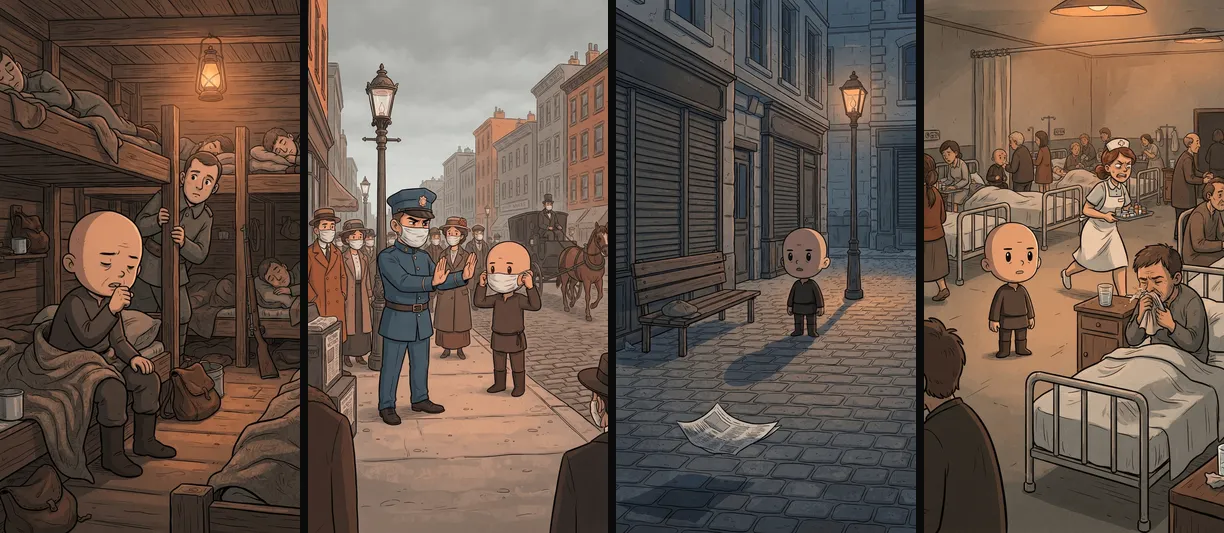
Step 1: Write the premise as one question
Change one thing, and only one. "What if you stayed in zero gravity for a year?" gives the script a single thread to follow; "What if you went to space and also met aliens?" gives it two, and neither gets finished. The question should be concrete enough that a viewer can picture the first second of it. That first second is your opening line.
Step 2: Decide who "you" are
The viewer is "you", but someone has to be on screen. It can be a person, an animal or your channel's mascot. In our Spanish flu video it is one small bald figure who appears in every scene, sometimes in the middle of the frame and sometimes as a bystander in the ward, so the viewer always has someone to stand in for them. A recurring stand-in also turns a run of videos into a recognisable series. Whatever you pick, attach it as a character so it is the same in every scene.
Step 3: Let the script climb a ladder of consequences
The format that works is a time ladder: each line jumps forward and each effect is bigger than the last. Our Spanish flu script runs "The first soldier coughs.", "Three days later, half the camp is sick.", "Week one, cities shut down.", "Month one, bodies pile up.", "Month six, the second wave hits.", "Year one, the flu fades." and lands on "Fifty million dead, but the world moved on." Short lines, one jump each, and a last line that makes the viewer sit with it. Thirty to sixty seconds holds six to twelve rungs.
Step 4: Fact-check every number
AI scripts get the shape of the science right and the details wrong, so check every number and every timing. The Spanish flu video's closing figure holds up: the CDC estimates at least 50 million deaths worldwide. Another of our test scripts, about a year in zero gravity, did not fully hold up. It says "Month three, you stretch taller, two whole inches." The size is right: NASA says the spine can lengthen by up to about 3% in microgravity, roughly two inches for a six-foot person. The timing is wrong: it happens in the first few days, not month three. The same script says your skeleton is "hollowing out" by year one; the measured loss is about 1 to 1.5% of bone density a month in the bones that carry weight. Serious, but not hollow.
Jokes can exaggerate; numbers and timings cannot, because "what happens to your body" viewers take them as facts. Check each claim against a primary source (NASA, a health authority, a published study), never present a dangerous experiment as harmless, and rewrite the line before you render. Our documentary guide has a fact-check routine that works here too.
Step 5: Review the scenes for the character
The other thing to watch is the "you" drifting. In our caveman video ("What if a caveman fought a saber-tooth tiger with modern weapons?") the caveman became a modern soldier from the second scene on: the words "modern weapons" pulled the images toward a soldier, because nothing said what the caveman looked like.

Two fixes work. Describe or attach the character before generating, and regenerate any scene that shows someone else with a note that says who it should show. Our guide to consistent characters explains why this happens.
Step 6: Publish it as a series
"What if" channels grow as series: the same format, the same narrator, often the same character, and a new question every time. That last part matters on YouTube, which does not pay for videos that are interchangeable with each other; each one needs its own premise and its own facts, not a new noun in the same script. More on that line in our YouTube automation guide. For length, Shorts and TikToks work best at thirty to sixty seconds (see our guide to video length), and a big science question can carry a few minutes as a 16:9 video of up to 15 minutes.
Questions
What is a "What if" video?
A short narrated video that follows one hypothetical question step by step, usually in the second person: what would happen to you, your body or the world if one thing changed. Most run 30 to 60 seconds as Shorts or TikToks.
Which AI makes "What if" videos?
You can chain a chatbot, an image or video model, a voice generator and an editor, or use one tool. ClipFlux makes the whole video from the question: the script as a timeline, every scene with the same character, the voice, music and captions.
Can I make "what happens to your body" videos with AI?
Yes, and they are the most popular kind. Check every medical or physical claim against a primary source such as NASA or a health authority, never present a dangerous experiment as harmless, and keep jokes clearly separate from facts.
Do "What if" videos need an AI label on YouTube?
Only if they look like real footage of something that did not happen, or show real people. Illustrated, animated and clearly impossible scenes do not need the label.
How long should a "What if" video be?
Thirty to sixty seconds for Shorts and TikTok: a hook, six to twelve rungs of consequences and a twist. A big science question can carry a few minutes as a 16:9 YouTube video.