
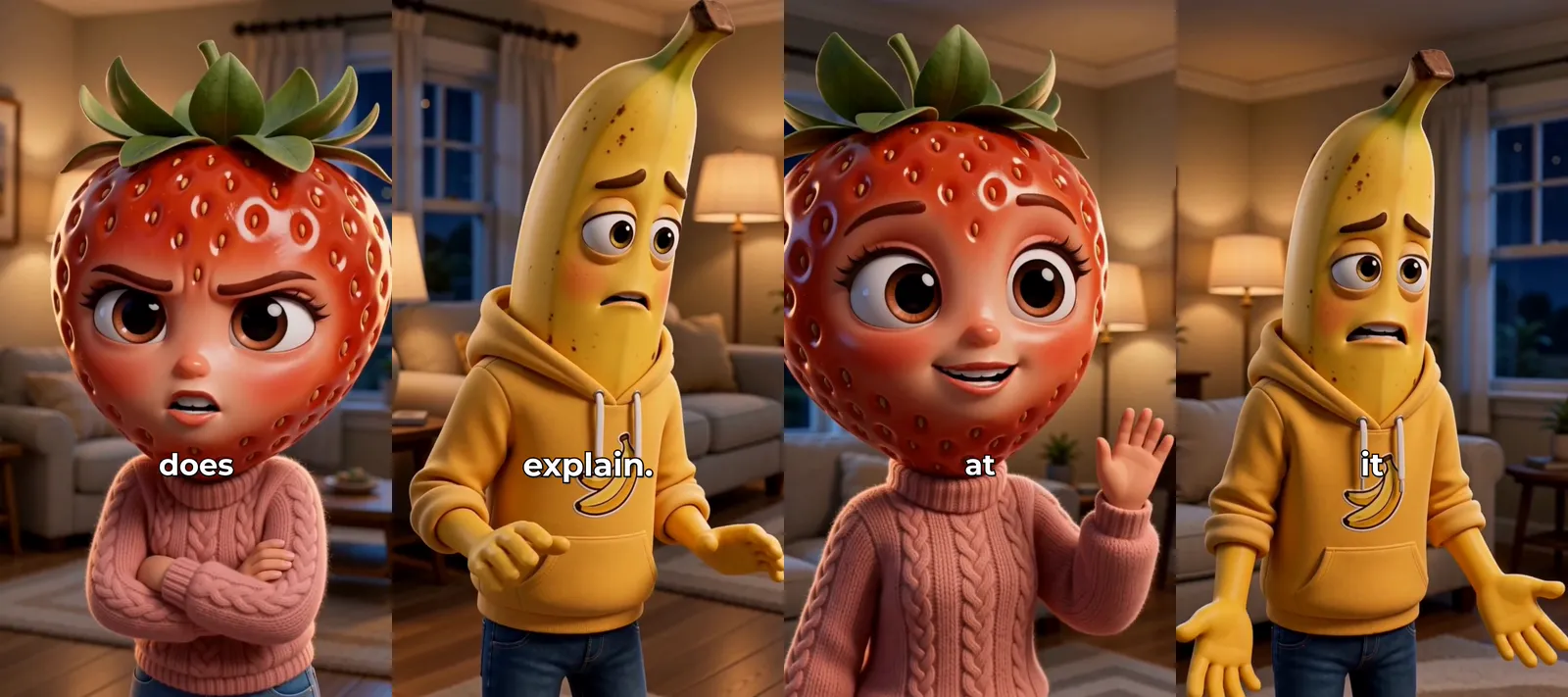
To make an AI video of two characters talking to each other, you write the conversation with each speaker’s name in front of their line, give each speaker a character and a voice, and have every line performed on camera, lip-synced. In ClipFlux that is a Talking character video with more than one speaker: each line becomes a close-up of whoever says it, turned toward the other person, and the video cuts between them the way TV films a conversation.
ClipFlux conversations, in short
- Up to 4 speakers, each with their own character picture and voice.
- Write “Name: line”, one turn per line. The names are labels and are never spoken.
- Every line is a lip-synced close-up of the speaker, looking at the other person, not the camera.
- Up to 150 spoken words, about a minute; the names do not count.
- Captions timed from each clip’s own audio.
- Regenerate one line without remaking the conversation.
Why most AI videos cannot do a conversation
A narrated AI video has one voice and no one speaking on screen, so a conversation turns into a narrator reading both parts. Making two characters talk takes three things at once: a way to tell the tool who says each line, a different face and voice for every speaker, and a clip per line in which the right character moves their mouth. Miss any one of them and the video falls apart: the wrong face says the line, or one character gets every line.
Step 1: Write the lines with names
On the create page choose Talking character, then Script. Write one turn per line, starting with the speaker’s name and a colon:
Maya: Did you just eat my leftovers?
Jake: Define “your”.
Maya: The box with MAYA written on it. In capitals.
Jake: I thought that was a brand.
The names before the colon are only labels: nobody says “Maya” out loud. A name inside a line is spoken, as when one character calls the other by name. You can also skip the typing and use the line editor: add the people once, and each Enter starts the next person’s line. A dialogue written in ChatGPT pastes straight in, as long as it keeps the “Name: line” shape.
Step 2: Give each person a character and a voice
Every name in the script gets a row of its own: pick the character whose face says those lines and the voice they say them in. Make both different for every speaker. The cut tells the viewer whose turn it is, and the voice confirms it, so two similar-looking characters with the same voice turn a conversation into a puzzle. Characters you make are saved, so the same pair can come back in the next video.
Step 3: Keep every turn short
One or two sentences per turn. Each line becomes its own clip, and a clip is best under about ten seconds: long enough for a thought, short enough to cut away before it drags. Long speeches are where a conversation stops feeling like one. If a character needs to say more, split it into two turns and let the other person react in between, even with one word.
Step 4: Generate one close-up per line
ClipFlux records each line in its speaker’s voice, then makes a close-up of that character performing it, mouth in time with the words. Each speaker is turned toward the other, one looking left, one looking right, so when the video cuts between them they seem to face each other. This is the shot, reverse shot that TV and film use for nearly every conversation, and it is why the cuts read as one scene instead of two people talking to the viewer.
Step 5: Check who said what, then post
Watch it once with one question in mind: is every line in the right face and the right voice? If one is not, regenerate that line alone. Then post it in 9:16 for TikTok, YouTube Shorts or Reels with the platform’s AI-generated label on.
Conversations that work
- Skits. A two-line setup and a punchline, between roommates, coworkers or a couple.
- Soap operas. A reveal every line and a cliffhanger at the end, like AI fruit drama videos.
- Interviews. A host asks, a historical figure or a mascot answers.
- Arguments. Two sides of a question, one character each.
For one character talking straight to the camera instead, see how to make AI talking character videos.
Questions
How many characters can talk in one video?
Up to 4. Each has their own character picture and voice.
Are both characters in the same shot?
Not yet. Each line is a close-up of the person speaking, turned toward the other, which is how TV and film usually cut a conversation.
Can I paste a dialogue written in ChatGPT?
Yes. Keep the "Name: line" format, one turn per line, and stay under 150 spoken words. The names are labels and are not read out.
Do the characters say the names in my script?
No. A name at the start of a line only marks who says it. A name inside a line is spoken, as when one character calls the other by name.