
To make a doodle explainer video with AI, pick a topic with a cast and a chain of causes, set a simple round-headed 2D cartoon look for the whole video, give the story one lead character, plan it in chapters, and narrate it calmly. In ClipFlux that look is called Doodle 2D: you type the topic as one sentence, for example "The Wall Street Crash explained", and it writes the script, draws every scene in the same doodle style with the same characters, and adds the narration, music and captions. You review the video scene by scene and render it in 16:9 for YouTube, up to 15 minutes, or 9:16 for Shorts. Choosing the topic and checking the facts stay with you.
ClipFlux for doodle explainers, in short
- Look: Doodle 2D, one of 9 looks, applied to every person and every background in the video.
- Characters: your own characters are redrawn as doodles and keep their skin tone, hairstyle and outfit in every scene.
- Length: 16:9 YouTube videos up to 15 minutes in chapters, or 9:16 Shorts.
- Finish: 95 narrator voices in 13 languages, music, captions, and per-scene regeneration with a written note.
- Cost: long videos are 38 credits a minute, from $0.97 a minute on a paid plan. A new account gets 60 credits, enough for a 1-minute test video, with no card.
What the doodle explainer look is
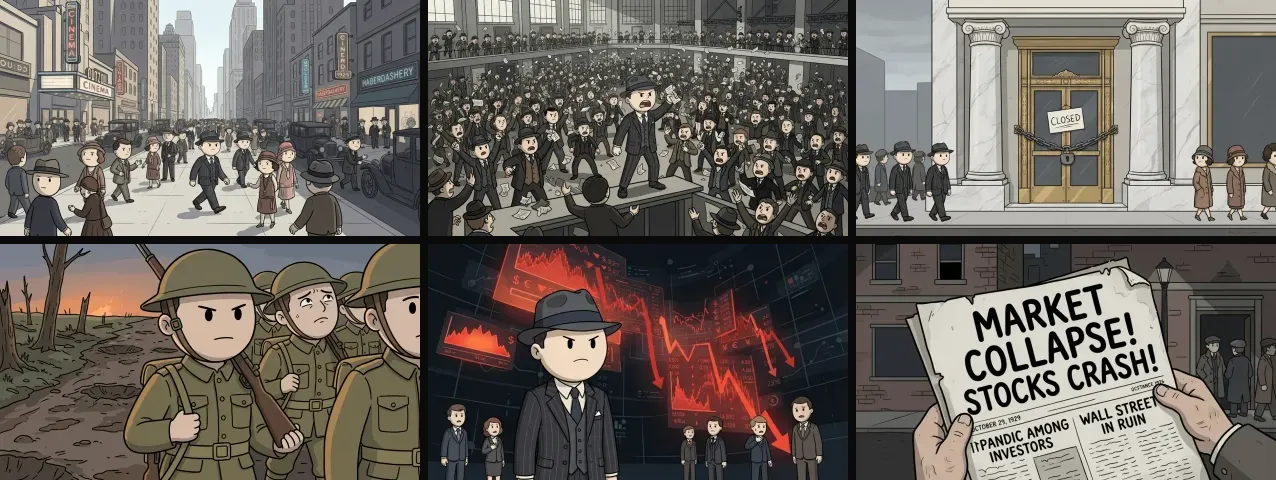
It is the hand-drawn history-explainer style that channels like Simple History made familiar: every figure is an oversized round head on a small body, about two and a half heads tall, with dot eyes and a single-line mouth. Outlines are thick and the same weight everywhere, colours are flat and muted, and backgrounds are drawn in the same simple shapes. (Simple History is an independent channel; we are not affiliated with it and say nothing about how its videos are made.)
The look suits AI unusually well. Small simple faces leave little room for the uncanny details that give AI images away. A round head and a hat stay recognisable from scene to scene, so one character can carry a whole video. And it reads instantly on a phone, where a detailed painting turns to mush.
Topics that suit doodles
- History explained. Events with a cause and a consequence: our Wall Street crash video walks from post-war boom through margin buying to the crash and the bank runs in 36 scenes.
- One person's war, or one person's life. Our First World War video follows a single soldier from the recruitment parade to the armistice. The doodle style keeps a grim subject watchable.
- Money and what-if stories. Our trillionaire POV runs 60 scenes in six chapters with one recurring lead in a fedora.
- How things work. Machines, systems, the body: anything you would explain with a whiteboard.
Step 1: Pick a topic with a cast and a chain of causes
Doodles explain best when people do things that cause other things. "Why the 1929 crash happened" has a cast (investors, brokers, banks) and a chain (easy credit, a bubble, a panic). "Facts about the 1920s" has neither, and turns into a slideshow. If you can write the topic as "X happened because Y, which led to Z", it will work.
Step 2: Set the look and a lead character
Choose the doodle look for the whole video, never per scene, and give the story a lead to follow. Our crash and trillionaire videos share the same man in a pinstripe suit and fedora, which turns two separate videos into something that feels like a channel. If you bring your own character, it is redrawn as a doodle and keeps its own skin tone, hairstyle and outfit. More on keeping a character stable in our guide to consistent characters.
Step 3: Plan it in chapters
A narrated explainer wants a new picture about every five seconds, so a five-minute video is around sixty scenes. Split it into chapters that each answer one question. Our trillionaire video runs six: The Impossible Number, The World Finds Out, The Burden Begins, The Hidden Cost, The Impossible Choice, What Money Can't Buy. Chapters also become your YouTube timestamps. The longer version of this is in our guide to long-form faceless YouTube videos.
Step 4: Check the text in every frame
Doodle explainers love signs, headlines and charts, and AI image models still misspell them. The newspaper in our trillionaire video gets its headline right, "Market Collapse! Stocks Crash!", and its subheading wrong: "Pandic among investors". Pause on every frame with words in it. Keep the scene if the mistake is too small to notice at full speed, regenerate it if not, or ask for the scene without text and put the words in the captions instead.
Step 5: Narrate it calmly and render
The doodle look does the entertaining; the voice should explain. A calm, slightly dry narrator at a steady pace fits it far better than an excited one, and the music should sit well under the voice. Render 16:9 at 1080p for YouTube, or 9:16 for Shorts: the style works vertically too, and our POV guide shows a doodle Short.
Questions
What is a doodle explainer video?
A narrated video drawn in a simple 2D cartoon style: round-headed figures, thick outlines and flat muted colours, used to explain history, money, science or a story step by step.
Can AI make videos in the Simple History style?
AI can make doodle explainers in that family of look: round heads, dot eyes, thick outlines, flat colours. ClipFlux has it as the Doodle 2D look. Simple History is an independent channel; ClipFlux is not affiliated with it.
Can my own character be drawn as a doodle?
Yes. In ClipFlux a character you upload is redrawn in the doodle style and keeps its own skin tone, hairstyle and outfit, so the same person is recognisable in every scene.
How long can a doodle explainer be?
As long as the topic holds. Shorts work at 30 to 60 seconds; history and money explainers usually run three to ten minutes as 16:9 YouTube videos.